
 Harsha Vardhan N

If you’re new to Character.AI, you might find it difficult to log out due to the unconventional placement of the Logout option. In this guide, we will help you find the logout option so you can easily sign out of your account when needed.
What we cover
Logout of Character.AI
- First, ensure that you have signed in with your Character.AI account. If you have successfully signed in, your account/profile name will be on the home page.

- The reason you are having difficulty finding the logout option is that you have accidentally hidden the left panel. To access the panel, click on the three horizontal bars present in the top left corner.

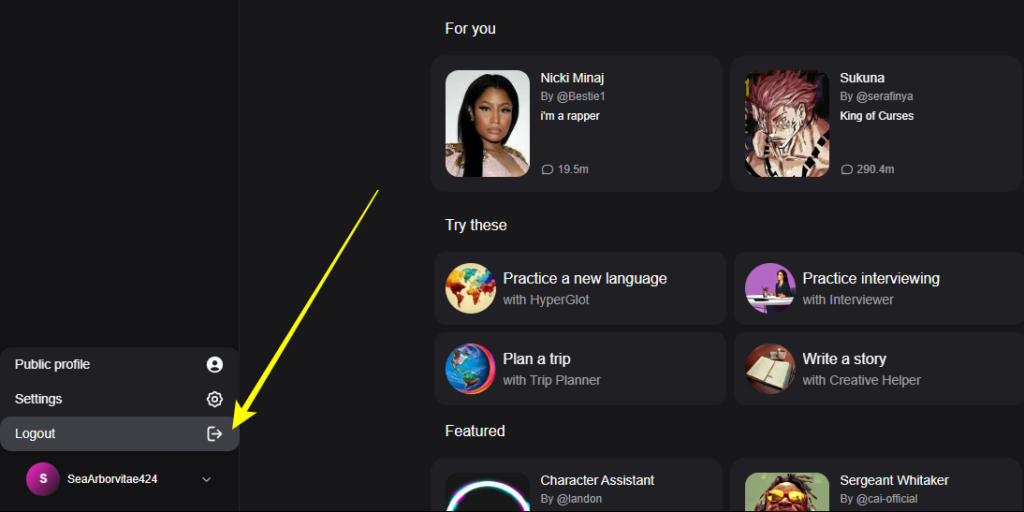
- If you haven’t hidden the left panel, navigate to your profile name and click on it to find options.

- From the options, click on the Logout option to log out of your Character.AI account successfully.
Logout of Character.AI from Settings
- If you can’t find the logout option, click on your name on the homepage to open your Profile. Now, find the Settings button and click on it.

- After the Settings modal is displayed, click on the Account option and then the Logout button to log out successfully.

Wrapping Up
Congratulations on learning how to log out of Character.AI!
It is ideal to log out of Character.AI, especially when using shared or public devices, to prevent others from reading your conversations with the characters created.


