Harsha Vardhan N

If you have been using Character.AI, you might have noticed the option to upload images has been removed. However, there is a way around it that lets you upload images from the web, but unfortunately, not from local storage.
In this guide, we will help you send images on Character.AI through a simple demonstration to get you covered.
Send Images on Character.AI
- Open the browser and find the image you want to upload to Character.AI. Once the image is loaded, right-click on it and then select Copy link address.

- After the image address is copied, go to Character.AI and open any character of your choice. Now, use the below syntax in the chat and fill in the info to upload to Character.AI.

Note: The description can be empty, but the complete URL needs to be added for it to work. Check the below image for reference.
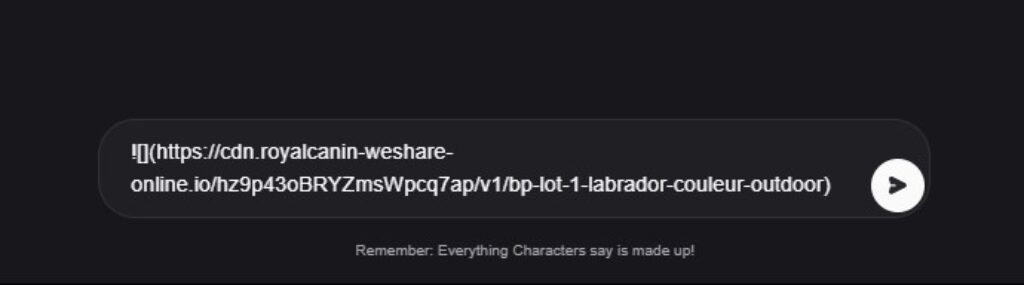
- After you use the syntax and add the URL as mentioned, send the message, and you will find the image successfully loaded onto Character.AI.

Wrapping Up
Congratulations on learning how to send images on Character.AI!
At present, the above approach is the only way to send images to Character.AI. Be aware that this approach can be inconsistent, as Character.AI failed to recognize a few images, and we had to upload alternate images for it to work.
Related Reading
How To Make a Character.AI Bot