
 Harsha Vardhan N

If you’re new to Figma and are trying to bold the text, you might not find a straightforward option like on text editors. In this guide, we will teach you how to bold text through a simple guide to get you covered.
Bold Text in Figma
- Open Figma on your browser and sign in with your credentials. Now, open the file you’re working on Recently viewed.

- After the design file is loaded, navigate to the text box and click on it to select it. For demonstration, we have added a text box with text in it.

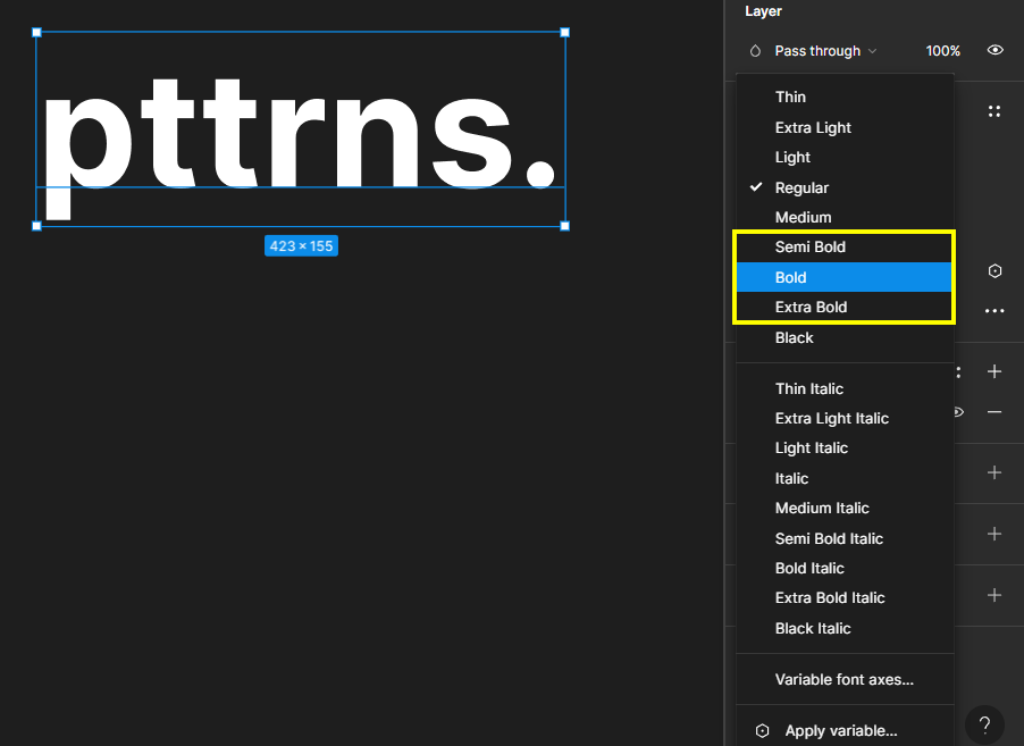
- When you select the text box, you will notice that the Properties panel is updated. Now, navigate to the Text section and click on the font style dropdown.

- Now, you will find multiple font styles. Based on your requirement, click on your desired bold level—Semi Bold, Bold, or Extra bold.
Wrapping Up
Congratulations on learning how to bold text in Figma!
Turning the text bold is straightforward in Figma. However, keep in mind that some fonts offer only the Regular font style. In this scenario, you cannot bold the text, and we usually add a Stroke as a way around for this. Again, this doesn’t apply to all fonts, so be aware while selecting a font and ensure that it supports all font styles.
Related Reading
How To Underline Text in Figma






